Office
Space Configuration of Office
Watch The Video Tutorial
After successful login for the first time (via any method) follow these steps to complete the app setup:
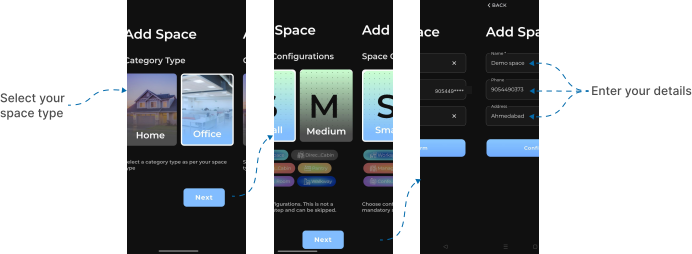
- You will be redirected to the Space Selection screen. Select where you intend to use the application: (Here we go with Office) and click Next.
- After that Space Configurations screen will shown, choose by your preferences either Small or Medium where you intended to use and click Next.
- You’ll be shown a Basic Details Form. Fill in the following:
- Name
- Phone Number
- Address
- Tap the Confirm button.
- You will now be redirected to the Home Page of the application.